

Virtual DJ 5.0 Freedownload

VIRTUAL DJ 5.0
MP3 DJ Mixer for live DJ performances.
Next Generation Software Virtual DJ Studio 5.0, December 19, 2006 - is an MP3 DJ Mixer for live DJ performances. With it, you can Mix MP3 Files, play Karaoke with Multiple Monitor Support, use multiple Sound Cards, and adjust Pitch and Tempo on each file individually. Virtual DJ Studio also contains a full 10-band Graphic Equalizer, full support for Audio Plugins, a Spectrum Analyzer, and many more tools for DJ's.
Virtual DJ Studio is unlike any other MP3 DJ Mixer. It allows you to have several Music Files loaded up and ready to go. It has an integrated ID3 Tag Editor and Playlist Editor, and many other unique features that allow you to Mix MP3's like a Pro.
Virtual DJ Studio now has full Karaoke support. VDJ allows you to impose a background image behind the lyrics, set colors, adjust sync, and so much more - no other Karaoke package gives you so much! A virtual mixing console for playing and crossfading mp3 and wav files. Also supports VDJ, M3U, and PLS playlists, and automatically crossfades the songs. Also features Smart Random, to ensure no repeats during shuffle play. Highly customizable interface.
Key Features:
Filled DJ Software - Virtual DJ Studio is not like all of the other DJ software out there. While other DJ software limit you to two players with a Cross-Fade, Virtual DJ Studio provides you with an entire studio. Click on the image to your right to see a full-sized picture of Virtual DJ in action. You will quickly see how VDJ is different from other DJ software. Laid out like a Mixer, each Line features a full MP3, WAV and Playlist player, with its own Volume Fader, Pitch/Tempo control, and more. You can select how many Lines appear on VDJs interface. You can configure as many lines as will fit on your screen.
Easy to Use - Don't be intimidated by the number of buttons you see in the picture. If you have a knack for audio equipment, you will quickly pick up on VDJ's use. VDJ comes with a complete Help file, including a Getting Started guide that will have you mixing MP3s in no time!
File Navigator - VDJ3's File Navigator gives you a whole new way to locate your music. It functions as a file manager, displaying all supported file types along with extra information (bitrate, sample frequency, bit resolution, etc). The File Navigator lets you preview any file without having to open it. File Navigator also contains an integrated Playlist Editor, for building and mana-gine PLS, M3U or VDJ playlist files. File Navigator also has two File Queues, holding areas for songs you just want to keep handy. You might use one for song requests, and the other to store common popular tunes. Both File Queues remember what they contained the next time you open VDJ.
Improved Drag 'N Drop Support - You can drag files from the File Navigator, File Queue, or any other Windows program (such as Windows Exporer or your Desktop). You can also drag files from any line in VDJ to another line, or into the File Queue. VDJ3 gives you limitless possibilities with Drag 'N Drop, allowing you to intuitively open and manage files.
Headphone Support - VDJ allows you to use an extra sound card for CUEing, or Previewing, a sound file. You can use this feature to assist with beat-mixing (fading two songs together on-beat), or for simply previewing a song before playing it live.
Plugin Support - VDJ3 now offers Plugin support. Third parties can contribute audio processing plugins that can be used within VDJ3's Plugin Manager. VDJ3 comes with a few Plugins as well, including a Compressor/Limiter, a Low-Pass Filter, and Stereo Expansion.
Download Link:
http://rapidshare.com/files/9416141/VirtualDJS.rar
Health Guide: Foods And Its Benefits
Foods And Its Benefits
Here is a short list of foods that some of us might not know about their benefit.
Apples
Protects your heart
Prevents constipation
Blocks diarrhea
Improves lung capacity
Cushions joints 
Apricots
Combats cancer
Controls blood pressure
Saves your eyesight
Shields against Alzheimer's
Slows aging process
Avocados
Battles diabetes
Lowers cholesterol
Helps stops strokes
Controls blood pressure
Smoothens skin 
Bananas
Protects your heart
Quiets a cough
Strengthens bones
Controls blood pressure
Blocks diarrhea 
Beans
Prevents constipation
Helps hemorrhoids
Lowers cholesterol
Combats cancer
Stabilizes blood sugar 
Beets
Controls blood pressure
Combats cancer
Strengthens bones
Protects your heart
Aids weight loss 
Blueberries
Combats cancer
Protects your heart
Stabilizes blood sugar
Boosts memory
Prevents constipation 
Broccoli
Strengthens bones
Saves eyesight
Combats cancer
Protects your heart
Controls blood pressure
Cabbage
Combats cancer
Prevents constipation
Promotes weight loss
Protects your heart
Helps hemorrhoids 
Cantaloupe
Saves eyesight
Controls blood pressure
Lowers cholesterol
Combats cancer
Supports immune system
Carrots
Saves eyesight
Protects your heart
Prevents constipation
Combats cancer
Promotes weight loss
Cauliflower
Protects against Prostate Cancer
Combats Breast Cancer
Strengthens bones
Banishes bruises
Guards against heart disease 
Cherries
Protects your heart
Combats Cancer
Ends insomnia
Slows aging process
Shields against Alzheimer's

Chestnuts
Promotes weight loss
Protects your heart
Lowers cholesterol
Combats Cancer
Controls blood pressure
Chili peppers
Aids digestion
Soothes sore throat
Clears sinuses
Combats Cancer
Boosts immune system 
Figs
Promotes weight loss
Helps stops strokes
Lowers cholesterol
Combats Cancer
Controls blood pressure
Fish
Protects your heart
Boosts memory
Protects your heart
Combats Cancer
Supports immune system
Flax
Aids digestion
Battles diabetes
Protects your heart
Improves mental health
Boosts immune system
Garlic
Lowers cholesterol
Controls blood pressure
Combats cancer kills bacteria
Fights fungus 
Grapefruit
Protects against heart attacks
Promotes Weight loss
Helps stops strokes
Combats Prostate
Cancer Lowers cholesterol 
Grapes
Saves eyesight
Conquers kidney stones
Combats cancer
Enhances blood flow
Protects your heart

Green tea
Combats cancer
Protects your heart
Helps stops strokes
Promotes Weight loss
Kills bacteria 
Honey
Heals wounds
Aids digestion
Guards against ulcers
Increases energy
Fights allergies
Lemons
Combats cancer
Protects your heart
Controls blood pressure
Smoothes skin
Stops scurvy 
Limes
Combats cancer
Protects your heart
Controls blood pressure
Smoothes skin
Stops scurvy
Mangoes
Combats cancer
Boosts memory
Regulates thyroid aids digestion
Shields against Alzheimer's
Mushrooms
Controls blood pressure
Lowers cholesterol
Kills bacteria
Combats cancer
Strengthens bones
CyberLink Power DVD

PowerDVD is the latest evolution of the world acclaimed DVD software program that offers maximum video and audio playback entertainment on the PC. It comes complete with numerous customizable video/audio controls that can deliver the highest quality viewing and listening experience. PowerDVD incorporates support for high-definition audio and video, true 8-channel home theater audio playback, virtual surround sound, as well as complete controls and extra features for DVD enthusiasts.
CyberLink enriches the high-definition movie experience with brand new PowerDVD 8, featuring support for interactive Blu-ray Disc and HD DVD features, home theater audio formats, and video file formats. New features let users extend the movie experience by building a database of movie info and trivia, writing movie reviews, rating their favorite movies, and creating movie remixes. A newly released web site dedicated to PowerDVD users allows the meeting and making of friends, and the sharing of movie information that can be synchronized with a user's own version of PowerDVD.
No. 1 DVD Experience on the PC now delivers New Dimensions in Movie Entertainment
* Indulge in the extreme quality of high-definition movies
* Explore high-definition Blu-ray Disc movies
* Remix your movies: create new stories to watch and share
* Build your own movie collection; write personal reviews
* Share a love of movies with new friends on MoovieLive.com
Enjoy High-Definition Movies
PowerDVD delivers award-winning playback quality for movies on the PC.
* High-definition movie content - The best video quality out there, with support for video formats like AVCHD and Blu-ray Discs.
* Advanced video technologies - See the beauty in each shot of every scene with TrueTheater™ Technology.
* Home theater audio - Enjoy movies on the PC as if you are right at the cinema, with support for Dolby, DTS, and other home theater technologies.
* Smart DVD utilities - Save battery power on your notebook (See-it-All), move language subtitles (Read-it-Clearly), and auto loop a section of dialog (Say-it-Again), with PowerDVD's award winning DVD controls.
Remix Your DVD Movies
PowerDVD lets you create new stories based on existing movies, or simply express your creativity and opinions in unconventional ways.
* Movie Remix - Put your own touches to a movie by re-ordering scenes, adding subtitles, inserting animated PiPs, and recording a voice-over.
* Watch other people's remixes - Download remixes from MoovieLive and see what other people have created.
* Share your remixes online - Upload your remixes to MoovieLive and let others share in your unique vision.
Collect Movie Information
PowerDVD helps you build a library of movie facts and figures, combining personal notes and disc information. Sync your movie collection to your MoovieLive account.
* Your movie collection - Create a collection of movies, and keep a record of your viewing experience. Gather data and trivia about the DVDs you watch.
* Reviews & ratings - Write reviews about the movies you've seen. Give a quick 5-star rating and compare that with what others like through the global rating.
* Quick movie stats - Quickly check how many PowerDVD users enjoy the same movies as you. PowerDVD lets you see the number of viewers, remixes made, reviews written, and DVD owners.
Connect via MoovieLive
PowerDVD gets you connected with other users via MoovieLive.com. You can see global ratings for the movies you watch, access information about the movies other people are watching too.
* Upload & download remixes - Download remixes to see different takes on a movie. Upload your own remixes to share with other PowerDVD users.
* Make friends - Find other people who are interested in the films you like, then get connected.
* Publish your thoughts - After writing a review of a movie, why not share your review with other PowerDVD users? MoovieLive lets you upload your review, and adds your ratings to the community's global rating.
* See what others have to say - Read reviews from other PowerDVD users and browse MoovieLive's database for tons of details about the movies you love (and loathe!).
CyberLink PowerDVD 8 offers complete multi-channel (4/6/7/8), S/PDIF and HDMI sound device support, including (but not limited to) devices from Analog Devices, Aureal, Creative, Cirrus/Crystal, CMedia, ESS, Fortemedia, KCTech, Philips/VLSI, Realtek, IDT, SiS, TI, Yamaha, VIA, and any other sound device that supports the Microsoft WAVEFORMATEXTENSIBLE interface.
CyberLink PowerDVD 8 supports Microsoft DirectX Video Acceleration (DXVA) in display chips or integrated chipsets from Intel, AMD, NVIDIA, SiS, and VIA/S3. Acceleration functions include Entropy Decode, Inverse Discrete Cosine Transform, Hardware Motion Compensation and Subpicture Alpha Blending units.
CyberLink PowerDVD 8 is fully optimized for multimedia instruction sets, such as AMD 3D Now! Professional, Enhanced 3D Now!, 3DNow!, Intel Streaming SIMD Extensions 2/3/4 (SSE/2/3/4), MMX, the Hyper-Threading technology, dual-core and quar-core CPU supported.
CyberLink PowerDVD 8 is compatible with new DVD-RAM, DVD-R/RW, DVD+RW, DVD-Multi, DVD-Dual, DVD-ROM/CD-RW combo drives, BD-ROM drives with IEEE 1394, USB 2.0, ATAPI, SCSI or CardBus interface, as long as the drive conforms to the SFF8090 command set and SBP-2 (if applicable).
CyberLink PowerDVD 8 is compatible with all Centrino, Socket 478, Socket 423, Socket 370, Slot 1, Socket A and Slot A chipsets from Intel, VIA, SiS, ALi, NVIDIA, and AMD. The features for hardware deinterlace and "Read it clearly" may need updated drivers to support them. If you find problems when using these features, please update your drivers to latest version and then try again.
CyberLink PowerDVD 8 is capable of high-definition audio decoding. However, due to the industries lack of common secure audio path technology, all protected audio content (eg. DVD-Audio, Blu-ray Disc) will force audio to be down-sampled to 48Khz/16bit output resolution. This constraint will be removed once an approved secure audio path is deployed for the PC ecosystem.
What's New in CyberLink PowerDVD 8:
Audio
* New! - Dolby Digital Plus*
* New! - Dolby TrueHD*
* New! - DTS-HD*
* DTS-ES*
* DTS Neo:6 (Discrete, Matrix)*
* DTS 96/24**
* AAC 5.1 Channel support**
* DTS**
* Dolby Digital 5.1
* Dolby Digital EX**
* Dolby Pro Logic IIx**
* Dolby Headphone**
* Dolby Virtual Speaker**
* TrueTheater™ - Surround (Multi-channel Environment Impression Mode)
* TrueTheater™ - Surround (Virtual Speaker Mode)
* TrueTheater™ - Surround (Headphone Mode)
* MLP lossless**
* SRS TruSurroundXT**
* Pitch scaling technology
* Audio equalizer presets
* Audio visualizations
* Direct 96/24 output
* MP3, WAV
Video
* New! - SMPTE VC-1 High-Definition Video*
* MPEG4 AVC (H.264) High-Definition Video**
* TrueTheater™ - Lighting (Adaptive lighting for video quality enhancement)
* TrueTheater™ - Stretch (Non-linear stretch technology)
* Video smart de-interlacing
Playback Formats
* New! - BD-ROM (Blu-ray Disc) playback*
* New! - BD-RE (Blu-ray Disc) playback*
* VCPS for DVD+VR with content protection
* CPRM for DVD-VR with content protection**
* DVD-Audio**
* External subtitles
* DVD files (DVD-Video, DVD-VR, DVD+VR) from any folder in your hard drive
Advanced Features
* New! - Movie Collection Support
* New! - Movie Remix
* New! - Integration with MoovieLive Service
* UPnP Support - Access your media from a Home Network**
* Say-It-Again - Automatically repeats the last movie scene
* See-It-All - Automatically speeds playback to show as much of the movie as possible
* Read-It-Clearly - Moves subtitles from the viewing screen
Download Links:
CyberLink Power DVD(Rapidshare) Part 1
CyberLink Power DVD(Rapidshare) Part 2
Health Tips
HEALTH TIP:
DRINK WATER ON EMPTY STOMACH
It is popular in Japan today to drink water immediately after waking up every morning. Furthermore, scientific tests have proven a its value. We publish below a description of use of water for our readers. For old and serious diseases as well as modern illnesses the water treatment had been found successful by a Japanese medical society as a 100% cure for the following diseases:
Headache, body ache, heart system, arthritis, fast heart beat, epilepsy, excess fatness, bronchitis asthma, TB, meningitis, kidney and urine diseases, vomiting, gastritis, diarrhea, piles, diabetes, constipation, all eye diseases, womb, cancer and menstrual disorders, ear nose and throat diseases.
METHOD OF TREATMENT
1. As you wake up in the morning before brushing teeth, drink 4 x 160ml glasses of water.
2. Brush and clean the mouth but do not eat or drink anything for 45 minutes.
3. After 45 minutes you may eat and drink as normal.
4. After 15 minutes of breakfast, lunch and dinner do not eat or drink anything for 2 hours.
5. Those who are old or sick and are unable to drink 4 glasses of water at the beginning may commence by taking little water and gradually increase it to 4 glasses per day.
6. The above method of treatment will cure diseases of the sick and others can enjoy a healthy life.
The following list gives the number of days of treatment required to cure/control/ reduce main diseases:
1. High Blood Pressure - 30 days
2. Gastric - 10 days
3. Diabetes - 30 days
4. Constipation - 10 days
5. Cancer - 180 days
6. TB - 90 days
7. Arthritis patients should follow the above treatment only for 3 days in the 1st week, and from 2nd week onwards - daily.
This treatment method has no side effects, however at the commencement of treatment you may have to urinate a few times.
It is better if we continue this and make this procedure as a routine work in our life.
Drink Water and Stay healthy and Active.
This makes sense .... the Chinese and Japanese drink hot tea with their meals ..not cold water. maybe it is time we adopt their drinking habit while eating!!! Nothing to lose, everything to gain...
For those who like to drink cold water, this article is applicable to you.
It is nice to have a cup of cold drink after a meal. However, the cold water will solidify the oily stuff that you have just consumed. It will slow down the digestion.
Once this "sludge" reacts with the acid, it will break down and be absorbed by the intestine faster than the solid food. It will line the intestine. Very soon, this will turn into fats and lead to cancer. It is best to drink hot soup or warm water after a meal.
A serious note about heart attacks: Women should know that not every heart attack symptom is going to be the left arm hurting.
Be aware of intense pain in the jaw line.
You may never have the first chest pain during the course of a heart attack.
Nausea and intense sweating are also common symptoms.
60% of people who have a heart attack while they are asleep do not wake up.
Pain in the jaw can wake you from a sound sleep. Let's be careful and be aware. The more we know, the better chance we could survive...
TypingMaster Pro 7.0
Typing Master Pro 7.0 Free Download
Posting a request from my seat mate in a training center
Your Personal Typing Tutor
Meet TypingMaster Pro, the personal touch typing tutor that adapts to your unique needs. The program provides customized exercises and helpful feedback to guide you step by step to professional keyboarding. As a result your typing speed will increase significantly saving you a lot of valuable work time.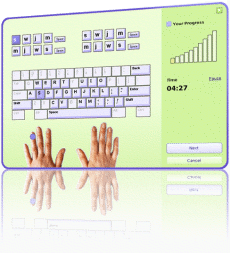
And for the download link:
TypingMaster Pro Freedownload (easyshare)
and if you were asked for a password while extracting:
password : www.ultimatewarez.net
Well thats all.. If you guys have any question regarding this post, please leave a comment and I will do my best to answer all of them.
ENJOY!
